
Square
The portal now shows what Square says about each merchant
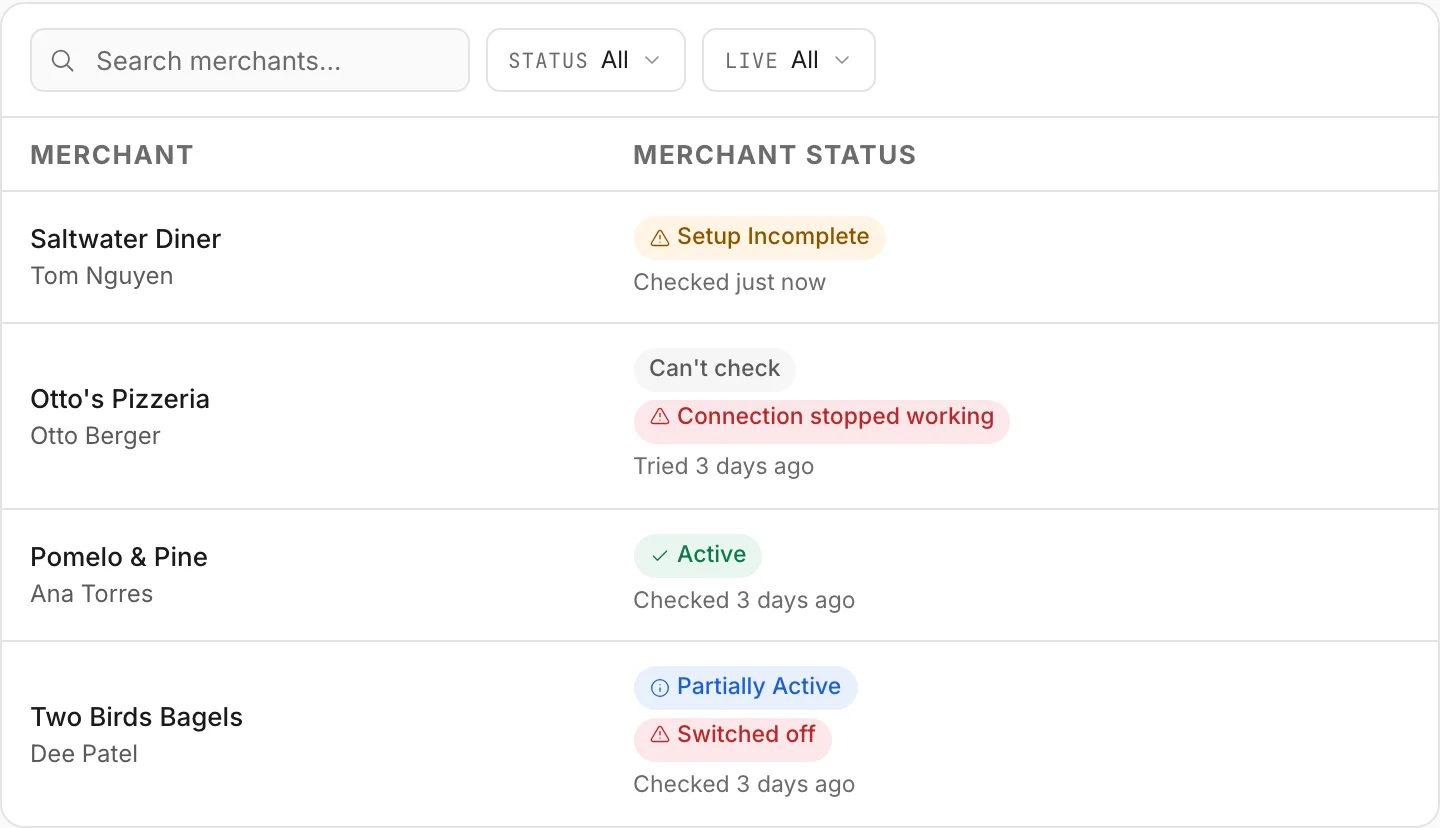
For a merchant whose application is Active, the status on your Merchants list now shows Square's own reading — Active, Partially Active, Setup Incomplete or Can't check — based on whether card payments and the bank account at Square are switched on, and the Help Center adds Square's recorded trainings and a Square marketing kit.
 Open full size
- A status that reflects what Square reports. For an Active merchant, the status column now shows Square's reading. Active: card payments and the bank account at Square are both switched on. Partially Active: one of the two is. Setup Incomplete: neither is yet. Can't check: we could not read this merchant from Square, or we have no Square Merchant ID on file for them.
- A reason beside the word, and a filter for who to call. When someone needs to act, a short reason appears next to the status. Connection stopped working is one only the merchant can fix, by reconnecting OrderOut from their own Square account, so it is worth a call. Filter your Merchants list by Setup Incomplete, or by Needs attention, to see who to call first.
- Submitted to Active on its own. An application now moves from Submitted to Active by itself, within about an hour of Square's Merchant ID reaching us. Nobody has to set it by hand, and the portal then re-checks the merchant with Square every few hours.
- Square's product trainings, recorded. Watch Square's product trainings for restaurants, retail and franchises in the Help Center, republished with Square's permission. Each one has chapters, short clips, answers to the questions resellers ask and a full transcript, and none of it needs a login.
- An email when Square schedules a new session. When Square schedules a new live training, we email the people we know at your company, with a calendar invite. Turn it off in portal Settings › Notifications, or with the link at the bottom of those emails.
- A Square marketing kit, ready to use. Download the Independent Square Reseller · Powered by OrderOut badge and logo files, with ready-to-use copy for landing pages, email, social posts and search ads, and the two disclosures to include. Nothing in it needs our approval before you publish.
Where to find itPortal → Merchants for the status and its filters, for the merchants inside your own scope as an ISO, sub-ISO or agent. The training recordings and the marketing kit are in the public Help Center, with no login needed.
What this does not do yet
- This is a reading, not an alert. You are not emailed when Square's reading changes or when an application turns Active; the Merchants list is where you see it.
- It is not live. The portal re-checks each merchant with Square every few hours, so a change made at Square can take that long to show here.
- Can't check means we do not know, not that anything is broken. We could not read the merchant from Square, or we have no Square Merchant ID on file for them yet.
- Holds and closures are still set by people. Missing Info, Paused, Rejected and Cancelled show as before, and Square's reading never replaces them.
- The status says whether card payments and the bank account at Square are switched on. It does not report processing volume, residuals or commission.
- A training recording shows the product as it was on the day it was recorded. Each one carries notes on anything that may have changed since.
- The marketing kit's two rules apply everywhere you publish: say that you are an independent reseller, and make no income claims.
Open your Merchants list Watch the Square trainings Open the marketing kit
All releases·All help guides·reseller@orderout.co
New to OrderOut? Request access — or read what the reseller program involves.