
Merchants
Each merchant gets a Square setup page and emails
Every merchant you sign up now has their own Square setup page in your name and colors, and gets an email that says their next step. You copy the page link from the merchant's page in the portal and follow each step on their Activity tab.
 Open full size
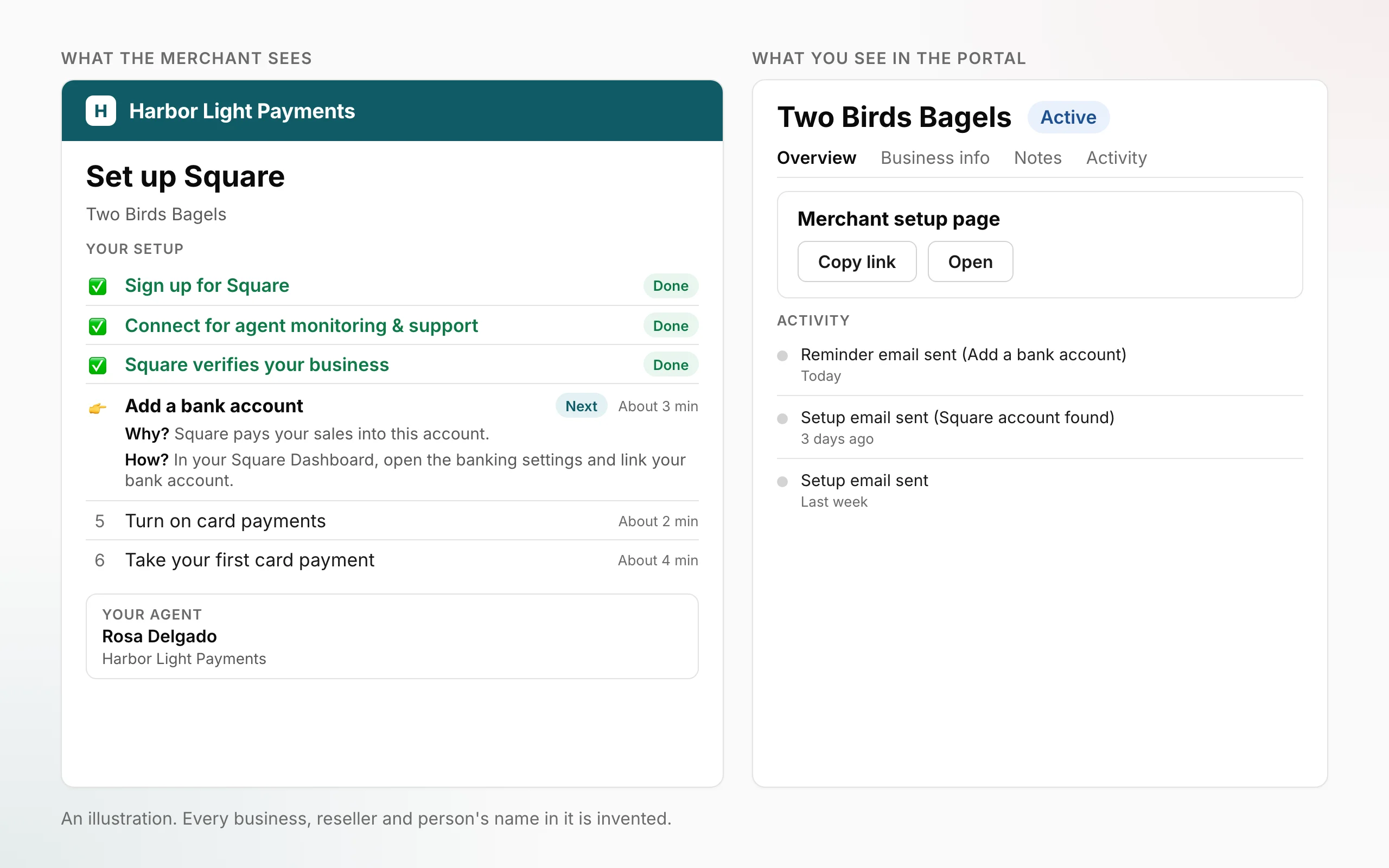
- A setup page for each merchant. The page, headed Set up Square, lists the merchant's seven steps under Your setup, from Sign up for Square to their first card sales, and marks the done steps and the one that comes next. It carries your name or logo and your color, and shows who to contact under Your agent.
- Connect my account. At the step Connect for agent monitoring & support, the merchant presses Connect my account, signs in to Square and chooses their location. From then on the page can read the steps that follow: Add a bank account, Turn on card payments and Take your first card payment.
- An email that says the next step. The merchant gets the same short email, with one button to their setup page, when they submit the application, when their Square account is found, when a step they do comes next, and once as a reminder when a step takes longer than usual. It is in English, Spanish or French, by the language they filled the form in, and in your name and colors. Your agent and your reseller contacts are copied, and a reply goes to the agent, or to your contact email when the agent has none.
- Copy link and Open, on the merchant's page. Open a merchant in the portal. At the top of their Overview, the Merchant setup page card has two buttons: Copy link and Open. Send the link to the merchant yourself, or open the page to see exactly what they see.
- Everything on the Activity tab. Each email sent, each time someone copied or opened the link, and a merchant who connected a different Square account than the one on their application all appear as lines on the merchant's Activity tab.
Where to find itPortal → Merchants → open a merchant → Overview, for everyone who can see that merchant, in any role, including OrderOut staff in Support view. The card shows while the application is open and the merchant has an OrderOut account. The merchant's page and emails need nothing from you.
What this does not do yet
- Merchants who applied before the setup page launched don't get these emails, and no email goes out for a rejected or cancelled application. A merchant who applied before launch has a setup page only once their OrderOut account exists: when the card shows on their merchant page, copy the link and send it yourself.
- No next-step email or reminder is sent when Square's verification or the card-sales goal is the next step. The last step is a goal OrderOut set, not a Square rule.
- A reminder goes out once per step, after that step has taken about three days, and only for a step the merchant can move. Square's verification gets no reminder.
- The steps after Connect can only be read once the merchant has connected their Square account. Until then they show as upcoming. The page shows each step's state, never an amount.
- If the merchant connects a different Square account than the one on their application, the page says which two accounts they are and the account is not connected. The application keeps the account it was set up for.
- When Square stops sharing the account with OrderOut, the page asks the merchant to press Reconnect my account. The merchant may be asked to approve the connection in Square again.
- You can't change the words on the page or in the emails. They use your name, logo, color and contact details as set for your organization.
Open your Merchants list Read how to follow a merchant's Square setup
All releases·All help guides·reseller@orderout.co
New to OrderOut? Request access — or read what the reseller program involves.